Waze Update: Traffic Light Indicators Now Rolling Out to Even More Drivers
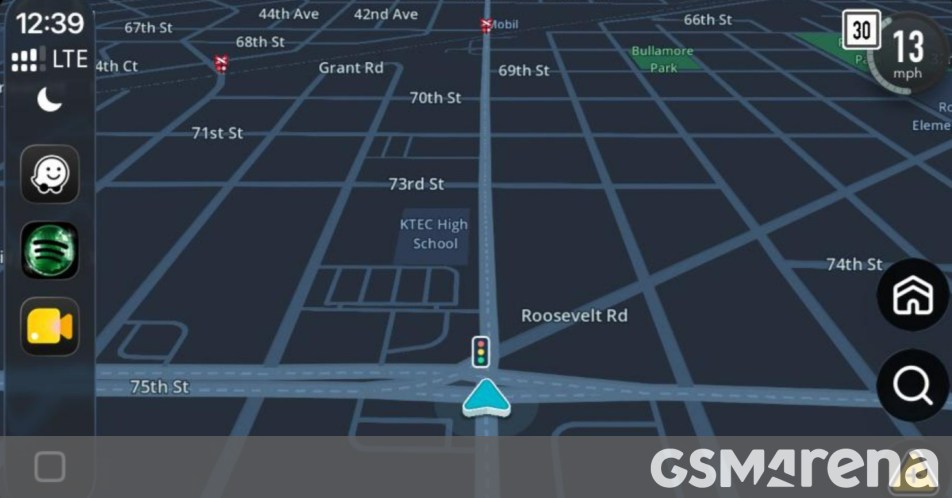
Waze is Finally Catching Up: Traffic Light Indicators Rolling Out to More Users
If you’re a Waze loyalist, you’ve probably felt that slight pang of navigation envy when looking at Google Maps users who can see exactly where every traffic light is on their route. It’s a small detail that makes a big difference when you’re trying to navigate an unfamiliar city. The good news? That feature is finally making its way to more Waze users around the world.
Reports have been trickling in across Reddit and various tech communities showing that Waze—the Google-owned, crowd-sourced navigation giant—is expanding its traffic light support. While the company started testing this internally late last year, we are now seeing a much broader, albeit gradual, rollout across multiple regions.
A Slow and Steady Expansion
Why haven’t you seen an official announcement yet? It seems Waze is sticking to its signature “slow-burn” release strategy. By rolling the feature out randomly to different user groups, the development team can gather data and iron out any kinks before a global launch. This explains why your friend across town might see stoplights on their map while your screen remains clear.
For those who rely on Waze for its superior real-time alerts—like spotting hidden speed traps or avoiding that sudden pothole—this addition is a welcome layer of context. Knowing a light is coming up helps with lane positioning and overall situational awareness, especially in dense urban environments.
The Competition is Already There
It’s no secret that Waze is a bit late to the party. Google Maps and Apple Maps have featured traffic light icons for quite some time. If this is a deal-breaker for your daily commute and you haven’t received the update yet, you might find yourself toggling over to Google Maps until the Waze rollout hits your device.
However, for the millions who prefer Waze’s community-driven spirit and quirky navigation voices, this update proves that the app is still evolving. Keep your app updated to the latest version and keep an eye on those intersections—you might just see those little red, yellow, and green icons appearing on your next drive.
About The Author





