Spotify enables saving and sharing clips from podcasts
Spotify Finally Makes it Easy to Share Your Favorite Podcast Gems
We’ve all been there: you’re deep into a podcast episode when the host drops a total truth bomb or a hilarious one-liner. You want to share it instantly, but sending a link to an hour-long episode usually means your friends will never actually hear the part you’re talking about. Thankfully, Spotify is finally solving that problem.
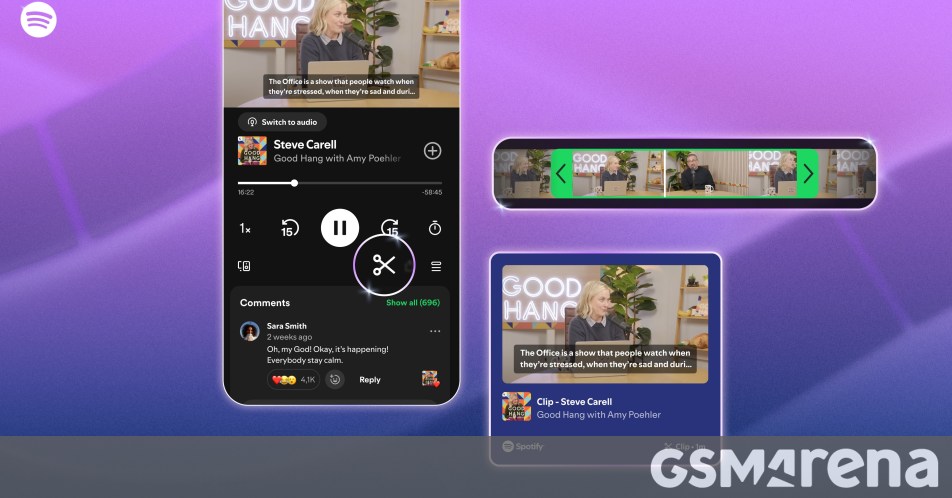
The streaming giant has officially launched a new Clips feature for its mobile apps, allowing users to create, save, and share specific snippets from podcast episodes without the hassle of timestamps.
How to Create Your Own Podcast Clips
Next time you’re listening on mobile, keep an eye out for the new clip icon on the playback screen. Tapping it pulls up a simple, intuitive editor where you can trim the exact portion of the episode that caught your ear. Once you’ve captured the perfect moment, you can save it directly to your library for future listening.
Sharing is just as straightforward. You can send your clips directly to other users through Spotify’s internal messaging or blast them out to your favorite social media platforms to give your followers a taste of what you’re listening to.
Rollout and Availability
The feature isn’t just for paying subscribers—it’s rolling out globally to both free and premium users on the mobile app. While it’s currently limited to a selection of specific podcasts, Spotify has confirmed that availability will expand to more shows over time. If you don’t see the icon on your favorite true-crime or comedy show just yet, hang tight; it’s likely on the way.
About The Author





