Next-Gen Apple Intelligence: A First Look at Apple’s Game-Changing AI Features
Apple Intelligence: The Game-Changing Features You Might Have Missed
While Siri’s AI makeover stole the spotlight at this year’s Worldwide Developers Conference, Apple quietly dropped a massive suite of “Apple Intelligence” features across its entire ecosystem. Whether you’re on an iPhone, iPad, Mac, or even wearing a Vision Pro, the way you interact with your devices is about to feel a whole lot more intuitive.
Photos Get a Professional Touch
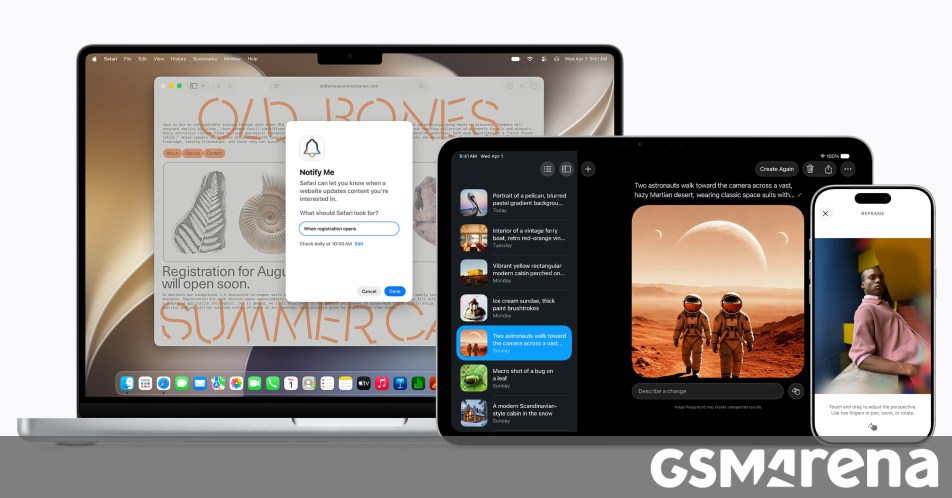
The Photos app is getting a serious power boost. One of the most impressive additions is Spatial Reframing. Imagine taking a photo and wishing you had stepped a few feet to the left—this tool lets you shift the perspective in real time after the fact. It’s essentially a digital time machine for your camera angle. Along with this, the Extend tool allows you to straighten out horizons without the annoying cropping that usually ruins a good shot.
For those who hate photobombers, the Clean Up tool has been overhauled. It can now scrub distractions out of complex backgrounds with much more realistic results, making your messy vacation photos look professional in seconds.
A Smarter Safari and One-Tap Security
Safari isn’t just a browser anymore; it’s becoming an active assistant. New AI-driven tab organization automatically sorts your open pages into relevant topics so you don’t have to. Even cooler is the Notify Me feature—you can tell Safari to watch a specific page and alert you the moment a price drops or an item is back in stock.
Security is also getting an automated upgrade. The Passwords app can now identify your weak or compromised login credentials and, with your permission, navigate to the website and change them to something ultra-secure on your behalf. It’s like having a digital bodyguard for your data.
Creativity Without the Learning Curve
Apple’s new Image Playground lets you generate high-quality images in almost any style—from sketches to photorealistic renders. Because privacy is a major concern, these models run on Private Cloud Compute, ensuring your prompts and images stay yours alone.
- Genmoji: Create custom emojis just by describing them.
- Contact Posters: Generate unique visuals for your friends and family.
- Shortcuts: Just describe the automation you want, and the app builds the steps for you.
Productivity That Actually Sounds Like You
We’ve all seen robotic AI replies, but Apple is taking a different route. Smart Reply in Mail and Messages now analyzes your personal writing style to suggest responses that actually sound like something you’d say. Plus, the Call Context feature in the Phone app can pull up relevant info—like a flight confirmation number or a dinner reservation—the moment you call a business.
Will Your Device Support It?
Apple Intelligence is powerful, which means it requires some modern hardware to run smoothly. Here is the compatibility shortlist:
- iPhone: iPhone 15 Pro, 15 Pro Max, iPhone 16 and later.
- iPad & Mac: Any model with an M1 chip or newer (and the A17 Pro iPad mini).
- Wearables: Apple Watch Series 10, Ultra 2, and the Vision Pro.
While most of these features are free, some high-end image generation tools may have daily limits that can be expanded with an iCloud+ subscription. It’s clear that Apple isn’t just adding AI for the sake of it—they’re making our devices genuinely more helpful.
About The Author