Android 17’s ‘Continue On’ feature will let you move tasks between devices
Android 17’s New ‘Continue On’ Feature: Say Goodbye to Cross-Device Friction
We’ve all been there: you’re deep into writing a long email or editing a spreadsheet on your phone during your commute, but as soon as you get home, you want to move over to your tablet for that extra screen real estate. Historically, that transition has been a bit clunky. At Google I/O 2026, Google officially addressed this pain point with a new Android 17 feature called ‘Continue On.’
Essentially, Continue On is Google’s answer to seamless cross-device continuity. It allows you to start a task on one Android device and pick it up exactly where you left off on another, keeping your flow state intact without the manual search for files or drafts.
How Does It Work?
Imagine you’re working on a Google Doc on your smartphone. With Continue On enabled, as soon as you pick up your Android tablet, a handoff suggestion will pop up right in the taskbar. One tap, and you’re back in the document, cursor exactly where you left it. It’s designed to be intuitive and fast, removing the ‘work’ from switching devices.
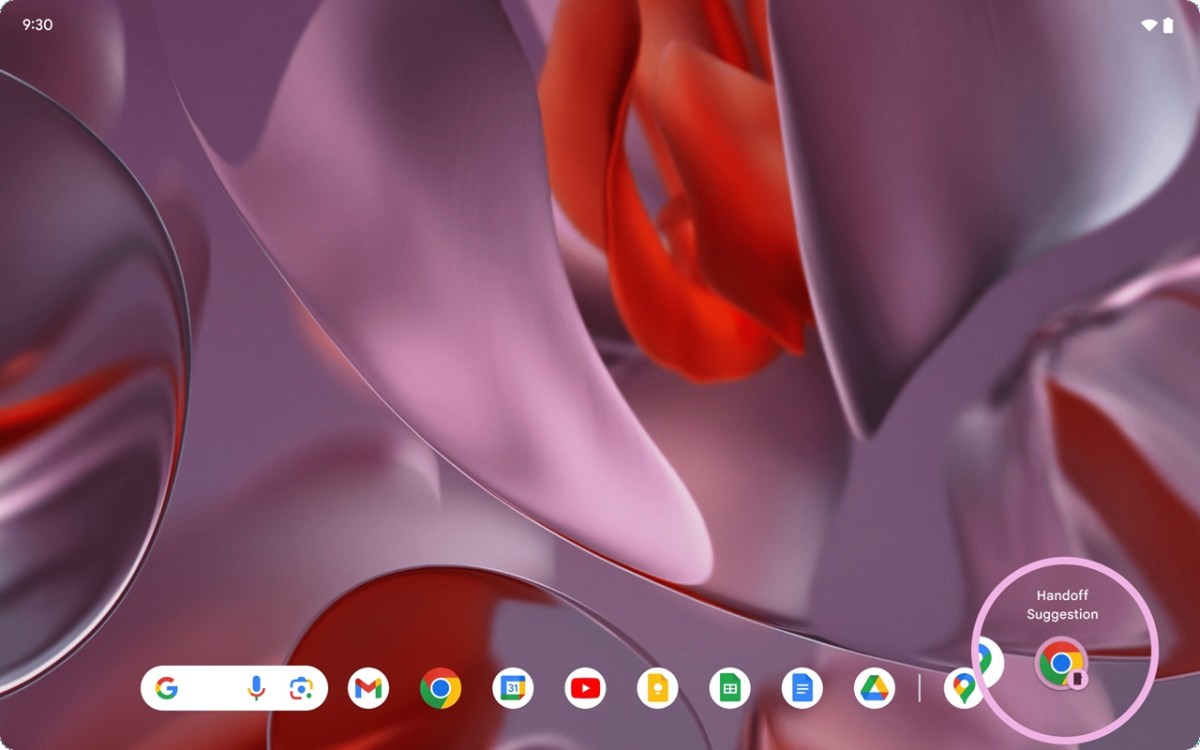
While the system is built to be bidirectional—meaning devices can both send and receive tasks—the initial rollout will focus primarily on mobile-to-tablet transitions. It’s a smart move, considering that’s where most users feel the need for a larger display.
App-to-App vs. Web Handoff
Google has made this feature flexible by supporting two distinct types of transitions:
- App-to-App Handoff: This is the gold standard. If you have the same app installed on both your phone and tablet, the activity moves directly from one app instance to the other.
- Web Handoff: This is the ‘safety net’ for productivity. If you’re writing an email in the Gmail app on your phone, you can choose to continue that task in your tablet’s default web browser instead of the app.
Built-in Fallback for Better Reliability
One of the smartest aspects of Continue On is the fallback system. If you try to hand off a task to a tablet that doesn’t have the specific app installed, Android won’t just give you an error message. Instead, it intelligently redirects the task to the device’s default web browser. This ensures that your workflow isn’t interrupted just because you haven’t downloaded a specific app on every single device you own.
When Can You Get It?
The Continue On feature is slated to arrive alongside the Android 17 release candidate. While developers will need to implement the API to support it, the potential for a more unified Android ecosystem is huge. For anyone who bounces between a flagship phone and a tablet like the Pixel Tablet or a Galaxy Tab, this is going to be a game-changer for daily productivity.
About The Author