Android 17 comes with a more convenient media app switcher
Android 17’s New Media Switcher Ditches the Carousel for a Cleaner Look
Google recently rolled out the Android 17 QPR1 Beta 3, and while most beta updates focus on under-the-hood polish, this one brings a noticeable tweak to your notification shade. If you’ve ever found yourself aimlessly swiping through a carousel of media apps just to find your podcast, you’re going to appreciate what’s coming next.
The current setup in Android 16 (and older) relies on a side-to-side carousel. It works, but it can feel a bit clunky when you have multiple apps like Spotify, YouTube, and Audible running simultaneously. In the latest Android 17 beta, Google is moving toward a much more intuitive, card-based layout.
What’s Changing?
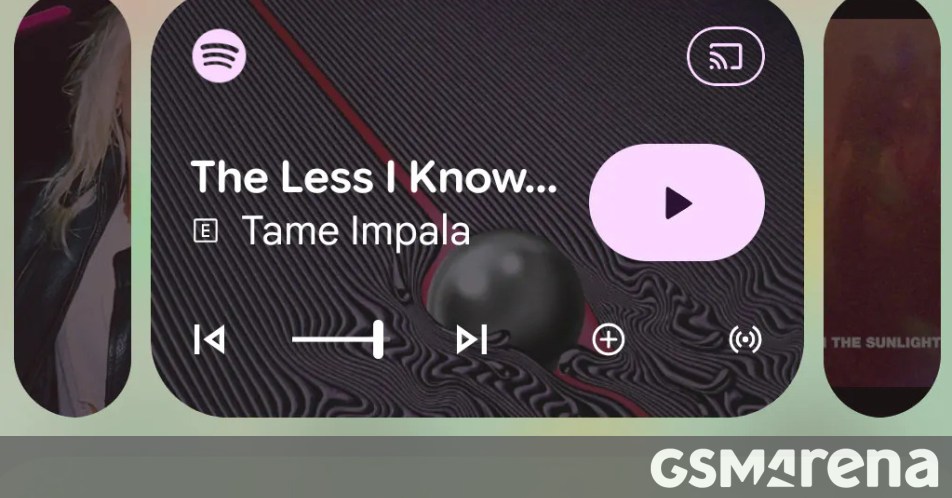
Instead of hiding inactive media players behind a horizontal swipe, the new UI minimizes them into small, distinct cards. When you want to switch focus, you simply tap the card you need, and it expands into the full player. It’s a subtle shift, but it makes the whole experience feel significantly more organized.
This is a big win for usability. It makes it immediately obvious that other apps are active in the background—a huge help for anyone who finds the current swiping gesture a bit hidden or unintuitive. No more guessing if there’s another app “tucked away” to the side.
The Trade-off
There is a slight catch to this new look. Because these minimized cards occupy their own space, they eat up a bit more vertical real estate in your notification shade. This forces the primary media player—the one you’re actually listening to—to shrink slightly. Consequently, the playback controls are a bit more compact than they used to be.
Since this is still in the QPR (Quarterly Platform Release) beta stage, it’s essentially a working prototype. Google often uses these releases to test the waters, so we might see some further refinements to the spacing and control sizes before the stable version of Android 17 officially hits the market. For now, it’s a promising step toward a more modern and accessible interface.
About The Author