Spend Your Rewards: Amex Now Lets You Use Points via Apple Pay
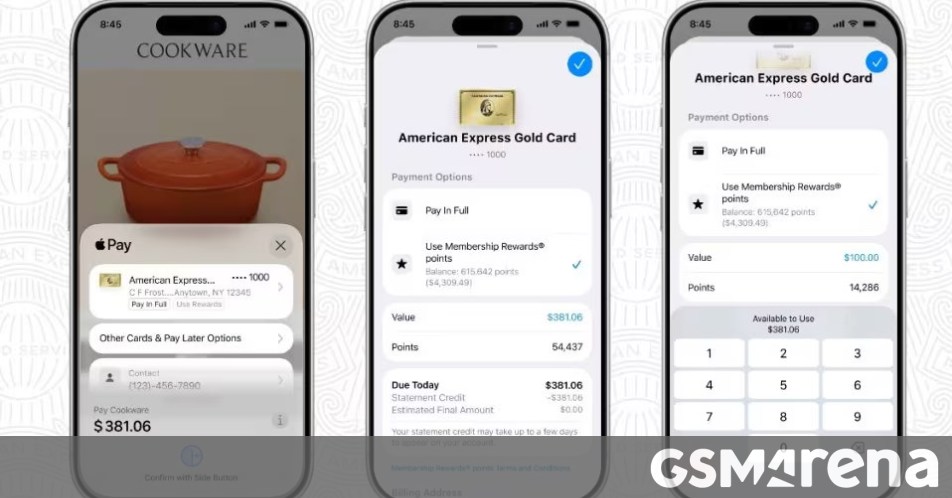
Use Your Amex Points Directly at Apple Pay Checkout
If you’ve been sitting on a stash of American Express Membership Rewards points, putting them to use just got a whole lot easier. You can now redeem those hard-earned points directly within the Apple Pay checkout flow for online purchases.
Gone are the days of jumping between apps or navigating through complex redemption portals. Now, when you’re shopping on your iPhone or iPad, the process is seamless:
- Select Apple Pay as your payment method at checkout.
- Choose your eligible American Express card.
- Tap Use Rewards.
- Decide how many points you want to apply to cover all or part of your purchase.
Once you complete the transaction, the points are deducted automatically. It’s a clean, friction-free way to lower your out-of-pocket costs while you shop.
Privacy and Setup
Security remains a priority here. American Express has confirmed that Apple does not retain any of your specific transaction data linked to these point redemptions, keeping your financial habits private.
If you haven’t added your Amex card to your digital wallet yet, it only takes a moment. Just open the Wallet app on your device, tap the + button, and follow the prompts to scan or manually enter your card details. Once it’s linked, consider setting it as your default payment method to make future checkouts even faster.
About The Author